
For many gamers, the PlayStation 5 (PS5) represents the pinnacle of home console gaming. With its powerful GPU, lightning-fast SSD, and support for 4K at high refresh rates, the PS5 can deliver an experience that feels almost next-gen.
Yet, for some players, the full potential of the console remains just out of reach. And often, the culprit isn’t the console, it’s the HDMI port on your TV.
Keep reading to discover how the right HDMI connection can unlock your PS5’s full performance and elevate your gaming experience.
Not all HDMI ports are created equal
It may sound surprising, but the port you plug your PS5 into can make a massive difference in performance.
Modern TVs typically have multiple HDMI inputs, but they’re not all the same. Many come with just one or two HDMI 2.1 ports, while the others remain on the older HDMI 2.0 standard.
HDMI 2.1, introduced in 2017, supports up to 48Gbps of bandwidth. This allows for uncompressed 8K video at 60Hz or 4K video at 120Hz, complete with HDR.
If you’re using a PS5 Pro released in November 2024, this port becomes even more critical, as AI upscaling in the console can push content to 8K, something only an HDMI 2.1 port can handle.
The problem is that not all manufacturers make these ports obvious. They might be labeled as “Gaming,” “eARC,” or “4K 120Hz,” leaving casual users unsure which one to pick.
Plugging your PS5 into the wrong port doesn’t break the console; it just holds it back. You might be losing out on smoother gameplay, faster frame rates, and the full HDR experience.
How the wrong port affects your gameplay
Let’s say your PS5 is connected to an HDMI 2.0 port. What happens?
- Resolution and refresh rate limitations: HDMI 2.0 maxes out at 4K 60Hz. You won’t be able to experience 4K at 120Hz or 8K output. Games that support higher frame rates will be capped, reducing smoothness and responsiveness.
- Disabled features: Features like Variable Refresh Rate (VRR) and Auto Low Latency Mode (ALLM) on PS5 only work if your TV or monitor supports them, typically via an HDMI 2.1 port.
- Reduced visual quality: Even HDR content may be limited if your TV can’t pass the higher bandwidth, resulting in washed-out colors or compression artifacts.
In short, using the wrong port means you’re not getting the performance you paid for. A PS5 Pro connected to HDMI 2.0 is a lot like driving a sports car in first gear; you’ll still move, but you’re missing out on the thrill.
Little‑known fact: Not all cables that claim HDMI 2.1 support the full 48 Gbps bandwidth; some only reach it at short lengths, so certified Ultra High Speed HDMI branding matters for true 4K120 or 8K support.
Troubleshooting your HDMI connection
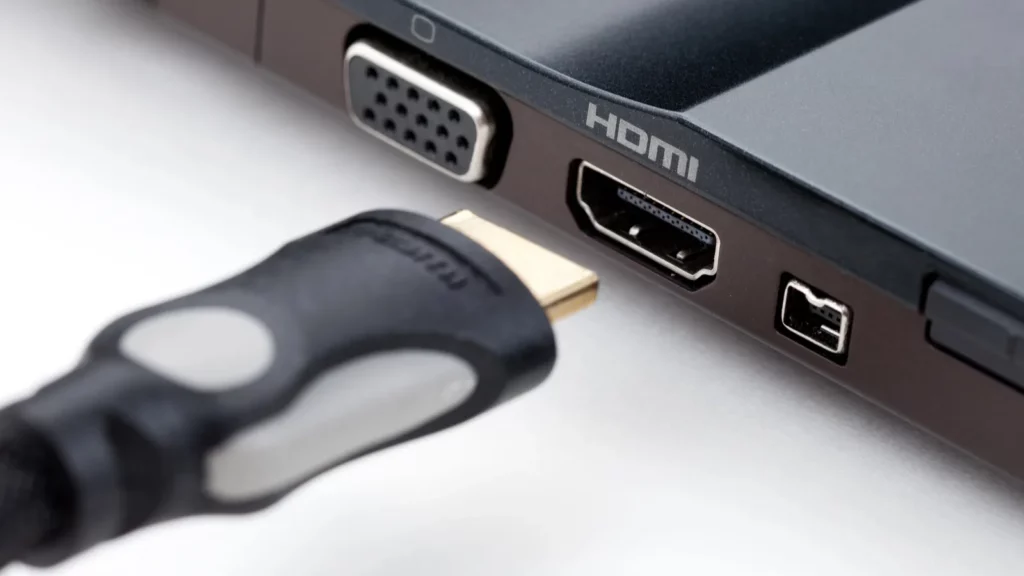
If you’re noticing issues like a blank screen, flickering, or poor image quality, it may not be the PS5 itself. HDMI problems can stem from several factors:
- Faulty or incompatible HDMI cable: Even if you’re using the correct HDMI port, a low-quality cable can bottleneck your performance. Your PS5 comes with an HDMI 2.1 cable, so make sure you’re using it and not an older replacement. Avoid third-party cables that don’t explicitly state “HDMI 2.1” or “Ultra High Speed HDMI.”
- Dirty or damaged ports: Dust, bent pins, or loose connections can prevent a stable signal. Inspect your console and TV ports, and clean them carefully with compressed air if needed. Avoid using sharp objects that could cause damage.
- Incorrect TV input or settings: Your TV may default to a different HDMI input or a mode that doesn’t support high bandwidth. Use your TV’s Input/Source menu to confirm the correct port and enable settings like “HDMI Enhanced” or “Game Mode” if available.
- Software and firmware issues: Both your PS5 and TV should be running the latest software. Firmware updates often include HDMI compatibility fixes and improvements for features like VRR and HDR.
- HDCP conflicts: The PS5 uses HDCP (High-bandwidth Digital Content Protection) for protected content. Some older displays may struggle with this protocol. Temporarily disabling HDCP in your PS5’s settings can help diagnose the issue.
Step-by-step fixes
Here’s a structured approach to get your PS5 back to peak performance:
- Inspect and clean your HDMI ports: Make sure both the PS5 and TV ports are free of dust or debris. A snug fit is essential for a stable connection.
- Swap your cable: Use the included PS5 HDMI 2.1 cable, or another certified cable. Test it on another device to confirm it’s functioning correctly.
- Verify TV input settings: Enable “Enhanced HDMI” or similar settings on your TV’s menu. Ensure the input corresponds to your HDMI 2.1 port.
- Update firmware: Check your PS5 under Settings → System → System Software → System Software Update and Settings. Update your TV firmware via the manufacturer’s website or USB method if needed.
- Boot in safe mode: If issues persist, start the PS5 in Safe Mode (hold the power button until you hear two beeps). Select “Change Video Output” and choose a compatible resolution.
- Test on a different display: If possible, connect the PS5 to another HDMI 2.1-capable TV. If it works there, the problem likely lies with your primary TV’s port.
- Reset display settings: A full reset can correct resolution mismatches. Turn off the PS5, then hold the power button until the second beep. Connect a controller via USB and select Reset Display Settings.
- Professional repair: If none of the above works, your HDMI port may be physically damaged. Services like uBreakiFix® by Asurion offer same-day PS5 HDMI repairs.
How to keep your setup healthy
Once you’ve resolved the issue, keep your setup in top shape:
- Invest in quality cables: Always use certified HDMI 2.1 cables.
- Keep ports clean: Dust and debris are common culprits in degraded connections.
- Use correct ports: Label or note which HDMI inputs on your TV support 2.1.
- Update firmware regularly: Both TV and console updates can fix performance and compatibility issues.
What you need to know about HDMI and the PS5
Your HDMI port matters more than you might think. Using the wrong port can limit your PS5’s resolution, frame rate, HDR quality, and advanced gaming features. To get the most out of your console:
- Plug your PS5 into an HDMI 2.1 port, not HDMI 2.0.
- Use the included PS5 HDMI 2.1 cable or another certified Ultra High Speed HDMI cable.
- Keep your ports clean and firmware up to date.
- Enable the proper TV input settings for gaming, like “Enhanced HDMI” or “Game Mode.”
- If issues persist, try Safe Mode, reset display settings, or test another TV.
By following these steps, you ensure your PS5 delivers the smoothest, sharpest, and most responsive gameplay possible.
Don’t let a simple port hold back your console’s performance. Unlock the full potential of your PS5 today.
This article was made with AI assistance and human editing.
If you liked this, you might also like:
Trending Products

iRobot Roomba Plus 405 (G181) 2in1 ...

Tipdiy Robot Vacuum and Mop Combo,4...

iRobot Roomba 104 2in1 Vacuum &...

Tikom Robot Vacuum and Mop Cleaner ...

ILIFE Robot Vacuum

T2280+T2108

ILIFE V5s Pro Robot Vacuum and Mop ...

T2353111-T2126121

Lefant Robot Vacuum Cleaner M210, W...

