
If you’ve ever bounced between live sports, streaming apps, and free ad‑supported channels, you know the pain of slow channel flipping.
Roku has quietly addressed that frustration with its 2026 TV‑side update. Channel hopping is now noticeably faster, smoother, and far less annoying, even on mid‑tier Roku TVs and streaming sticks.
The improvements come alongside a refreshed Live TV Guide and a new Last Channel button, bringing the responsiveness of legacy cable to a streaming‑first platform. Read on to find out.
What changed in channel flipping
Roku has introduced a Last Channel button in the remote‑accessible guide. Pressing it instantly returns the viewer to the previous channel, much like the recall button on old cable remotes. This is especially useful for sports fans or anyone toggling between two or three live streams.
Previously, users had to scroll through dozens of slots or reopen recent‑channel lists to return to a channel. Now a single press does the job.
The Live TV Guide also received a significant update. A dedicated search bar sits on the left‑hand rail, allowing users to type or speak a channel name or show title. This eliminates the need to scroll endlessly through hundreds of free ad‑supported channels.
Finding a specific channel is now almost as fast as typing in a web browser, saving viewers from the “scroll fatigue” that plagued earlier Roku interfaces.
How the backend makes it faster
Roku’s improvements are not just cosmetic; they represent a deep-level optimization of how the operating system handles content. Firmware updates like Roku OS 15 have introduced code refinements that make devices feel snappier and more responsive during channel transitions.
To maintain this speed, users can perform simple maintenance habits such as restarting the system or checking for manual updates, which help clear the cache and reduce perceived lag between channels.
This matters on mid‑tier Roku TVs, where switching between apps or live channels could previously feel sluggish.
For FAST channels such as Pluto TV or The Roku Channel, the old model required tearing down one stream and setting up another, adding one to three seconds of delay.
Roku’s 2026 refinements cut this “hand‑off” time significantly. Indexed channel guides and in‑guide search also reduce blind hops, letting viewers reach their desired content faster.
How it feels day to day
Roku’s updates make three viewing scenarios feel noticeably smoother. First, browsing is less frustrating. The search bar in the Live TV Guide allows viewers to jump directly to channels or show titles, avoiding long drags through genre tiles.
Channels from The Roku Channel and Live TV Zone, now including over a hundred free entries and new additions from networks like ITV, are easier to locate.
Second, quick toggling between favorites is now painless. The public reporting supports switching between antenna channels and supported live streams within the Live Guide.
This eliminates repeated navigation through home screens or favorites lists. Third, entry from the home screen feels snappier. The 2026 home‑screen redesign promotes The Roku Channel and the Live TV Guide while keeping the interface responsive.
Channel switching now feels faster and more responsive, though Roku has not published an exact speed figure.
Little-known fact: In March 2026, Roku added five new ITV Studios FAST channels in the UK: The Graham Norton Show, Hell’s Kitchen, Hotel Inspector, River Monsters, and British Screen Classics, building on 40 FAST services already added in 2025.
How does Roku compare to other platforms?
Compared with Fire TV, Google TV, and older cable-style UIs, Roku now offers a hybrid approach. Viewers get an abundance of free FAST channels while enjoying cable‑style conveniences.
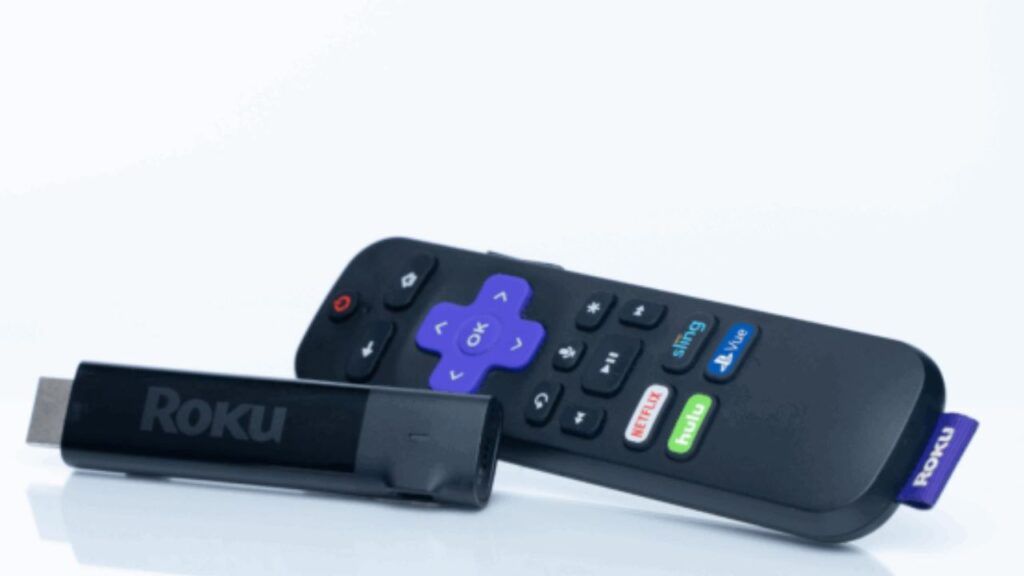
The updated ‘jump back’ button (represented by the circular arrow) allows Roku TV users to instantly toggle between their two most recently viewed live channels. This feature is specifically designed for the Roku Live TV Guide, enabling seamless switching between over-the-air antenna signals and supported free live streaming channels without having to navigate back through the full program grid.
Other platforms often rely on broad app‑switching gestures or require launching separate live or guide apps. That process can feel fragmented and slower.
Roku keeps the Live TV Guide and The Roku Channel as first‑class UI elements while speeding up transitions. The result is a unified, streaming‑first cable experience that balances speed and convenience.
Broader context in Roku’s 2026 strategy
The channel-flipping enhancements fit into Roku’s wider 2026 user experience overhaul. The company has redesigned the home screen to highlight algorithmic recommendations for both free and subscription content.
Roku’s home screen now features a dedicated Subscriptions tab that aggregates content from across your paid streaming services into a single, unified view. Introduced with Roku OS 15.1 in early 2026, this hub automatically clusters recently watched shows and new releases from platforms like Disney+, Max, Paramount+, and Peacock, provided the subscriptions are managed through a Roku account.
By pulling together ‘Continue Watching’ and ‘Newly Added’ rows from these diverse apps, the interface reduces the need to manually toggle between individual icons to find something to watch.
Roku aims to keep navigation manageable even as channel numbers climb. The focus is on reducing friction rather than simply adding more rows of content.
Little-known fact: Roku said on January 7, 2025, that it had surpassed 90 million streaming households and was in nearly half of all U.S. broadband households

Practical tips for users
The update is primarily software-based and delivered via OTA updates. No new hardware is required to access the faster guide and Last Channel button.
Users who still notice lag can improve performance by restarting the device through the Settings menu or by checking for System → Software updates. While not listed in official consumer support materials, some third-party guides suggest a ‘soft reboot’ using a remote button sequence (Home ×5, Up, Rewind ×2, Fast-Forward ×2) to clear temporary data and refresh the system.
While Roku’s 2026 update makes channel switching feel faster, overall performance still depends on how the device behaves over time.
If your streaming stick feels sluggish despite the new optimizations, it may not be the update at all, but how the device handles continuous use.
In fact, many users overlook what happens when a Roku stays powered around the clock, from background updates to cache buildup and heat management.
If you’re curious how that impacts speed, responsiveness, and long-term performance, it’s worth taking a closer look at what really happens when a Roku Streaming Stick stays plugged in 24/7.
Why does faster channel flipping matter?
Channel flipping isn’t just a convenience; it changes how viewers interact with streaming content. Sports fans can follow multiple games simultaneously, award-show viewers can jump between categories, and families can toggle between news, cartoons, and subscription apps without waiting.
By streamlining navigation, Roku reduces the friction that often discourages exploring new free channels or apps.
The combination of Last Channel recall, in-guide search, and backend optimizations creates a flow that feels natural. It encourages viewers to treat Roku as a complete entertainment hub rather than a collection of apps.
This is particularly relevant as ad-supported channels continue to grow and the number of streaming options rises.
Future implications
Roku’s 2026 updates suggest a trend in streaming UX: blending traditional TV behaviors with modern streaming flexibility. Features like the Last Channel button may appear on other platforms if users respond positively.
Searchable guides could become standard across all major streaming interfaces, especially as FAST channels proliferate.
For Roku, these changes also support its broader content strategy. The platform can continue adding free channels without overwhelming users.
The improved navigation makes viewers more likely to try new content while reducing frustration from slow channel switching. This balance strengthens Roku’s position in the competitive streaming landscape.
TL;DR
- Roku added a Last Channel button for instant toggling between the previous channel.
- The Live TV Guide now has a dedicated search bar to find channels or shows quickly.
- Backend optimizations reduce stream hand-off delays, improving perceived speed.
- Browsing, toggling between favorites, and home-screen entry are now faster.
- Roku’s hybrid approach combines the abundance of free channels with classic cable conveniences.
- Updates are software-based; performance can be further enhanced with a restart, cache clear, or software update.
- These refinements fit into Roku’s broader 2026 strategy of content-centric navigation and expanded free channels.
- Faster channel flipping improves usability for sports, live events, and mixed free/subscription content.
- Roku’s changes suggest a trend toward hybrid streaming interfaces that mimic cable efficiency.
This article was made with AI assistance and human editing.
If you liked this, you might also like:
Trending Products

iRobot Roomba Plus 405 (G181) 2in1 ...

Tipdiy Robot Vacuum and Mop Combo,4...

iRobot Roomba 104 2in1 Vacuum &...

Tikom Robot Vacuum and Mop Cleaner ...

ILIFE Robot Vacuum

T2280+T2108

ILIFE V5s Pro Robot Vacuum and Mop ...

T2353111-T2126121

Lefant Robot Vacuum Cleaner M210, W...

